
Short version
Most delay claims are not lost on the argument. They are lost on detail: nobody can say which day, how long, who was idle, or who caused it. An app helps only if it records that detail the same day and in a form nobody can later say was edited.
Daily Site Log was built around this. We make it; other tools are described from their own documentation, linked below.
What a delay record must capture
| Field | Example |
|---|---|
| Type | Late material delivery (one of 11 types) |
| Start and end time | 07:30–11:00 |
| What was affected | 4 carpenters, 1 scissor lift |
| Impact | 14 labour hours, 3.5 equipment hours |
| Responsible party | Supplier: CityMix Concrete |
| Notice | Sent to GC with the day's report, 17:42 |
| Photos | Empty slab at 07:35, stamped with time and GPS |
Recording one in under a minute
- In the day's report, tap the mic: "CityMix truck two hours late, pour moved to 11, four carpenters idle from 7:30." AI creates the delay row; you check type, times and responsible party.
- Take a photo in the app. Time, GPS and a SHA-256 hash are burned into it and printed as verified in the PDF.
- Submit. The report is sealed with a fingerprint the client can check at dailysitelog.com/verify.
- When you need it, export the project delay PDF: every delay, every day, with photos, in one document.
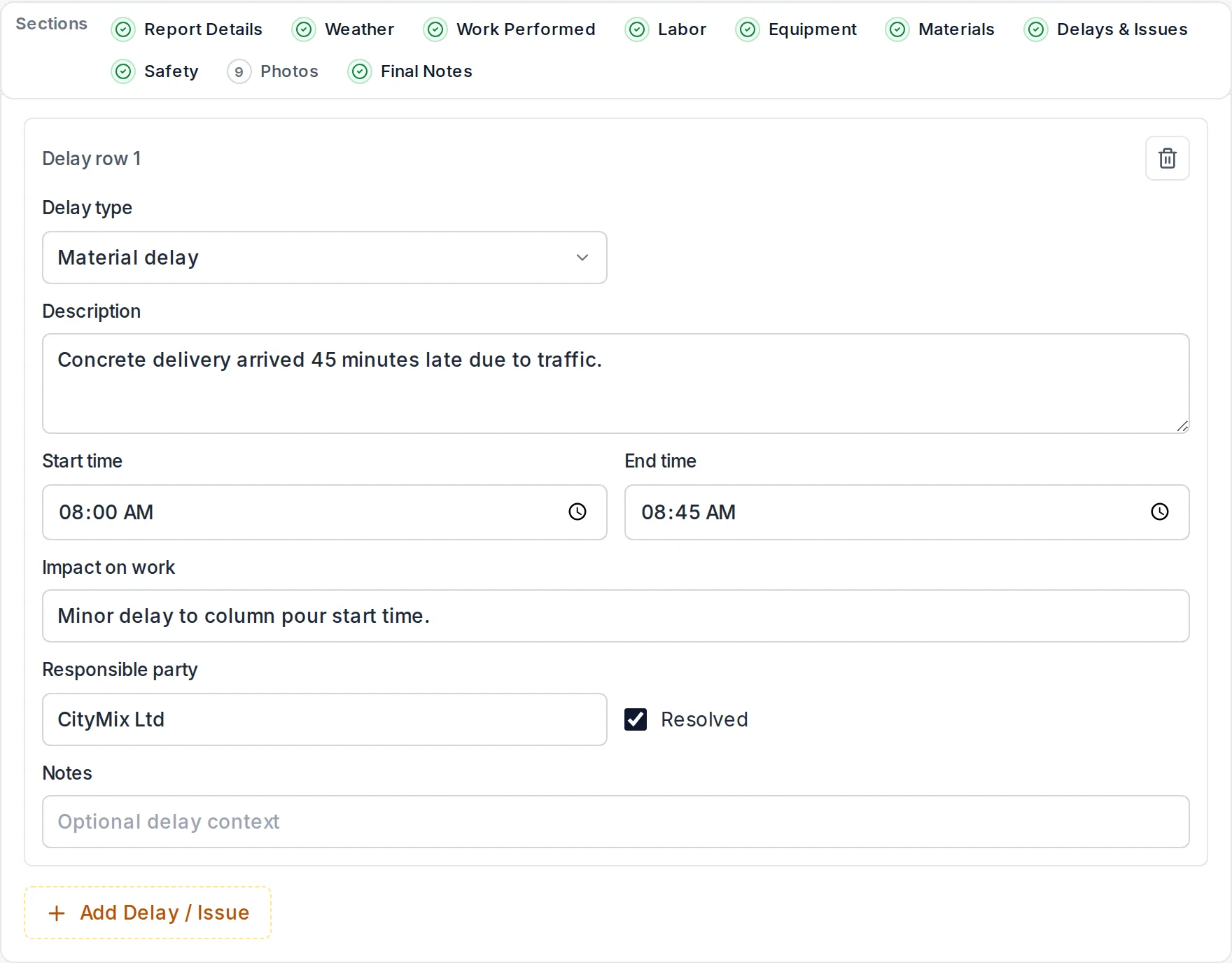
How the main apps handle delays
| App | Delay records | Photo proof | Tamper evidence | Price (2026) |
|---|---|---|---|---|
| Daily Site Log | Structured: 11 types, times, impact, responsible party; project delay PDF | Time, GPS and SHA-256 hash | Sealed reports, public verification | $0 · $19 · $79/mo per company |
| Raken | Delay section in the daily report | Timestamped photos | Audit history | Reported ~$15–$59/user/mo |
| Procore | Delay log in the daily log tool | Yes | Audit log | Volume-based, typically $4,500+/yr |
| Fieldwire | Custom form fields or tasks | Pinned to plans | Version history | ~$39/user/mo on Pro |
| CompanyCam | Notes on photos | Timestamped photos | Not a sealed record | ~$63–$199/mo annual |
Habits that win delay arguments
- Record every delay the day it happens, even 20-minute ones. Small delays add up and establish a pattern.
- Put the responsible party in plain words.
- Photograph before you start work, especially areas left by other trades.
- For weather, follow the checklist in how to document weather delays.
- Send the report daily and follow your contract's notice clause. See construction delays and liquidated damages.
Start recording delays free, no card needed.
Turning records into a claim? Read construction delay claims.
Sources
- Daily Site Log pricing
- Raken — daily reports help
- Procore — daily log
- Fieldwire pricing
- CompanyCam pricing
Frequently asked questions
What details does a construction delay record need?
The date, what stopped the work, start and end time, which crew and equipment stood idle, impact in hours, who caused it, whether notice was given and to whom, and photos. Vague entries like 'waiting on drywall' are weak; 'no access to level 2, drywall not complete, 07:30–11:00, 4 carpenters idle, 14 hours lost' is strong.
Why are photos often rejected as delay evidence?
A photo from a phone gallery does not prove when or where it was taken. Photos captured in an app that records the time, GPS position and a file hash at the moment of capture are much harder to dispute.
Can I export all delays for a claim?
Yes. Daily Site Log produces one PDF listing every delay on a project with dates, times, causes, responsible parties and linked photos, built from the sealed daily reports.
Does recording a delay count as notice?
Not automatically. Most contracts require written notice within a set period. Sending the day's report to the client or GC the same day creates a dated record, but follow your contract's notice clause exactly.
Does it work for weather delays?
Yes. Weather for the site and date is filled automatically on Pro and Business, and a weather delay can be recorded with its times and impact. See our guide to documenting weather delays.