
Download the template
The three files above are the same template in three formats. They cover every section a daily report needs on a real job and nothing that only exists to make the page look full. They are free, there is no email gate, and you can edit, rebrand and redistribute them inside your company.
If you would rather not type the same headings every day, the free plan of Daily Site Log produces the same report as a sealed PDF from a phone, with the weather filled in and the photos stamped. But a template is where most small contractors start, and a good template used every day beats a good app used twice.
What a daily report template needs (10 sections)
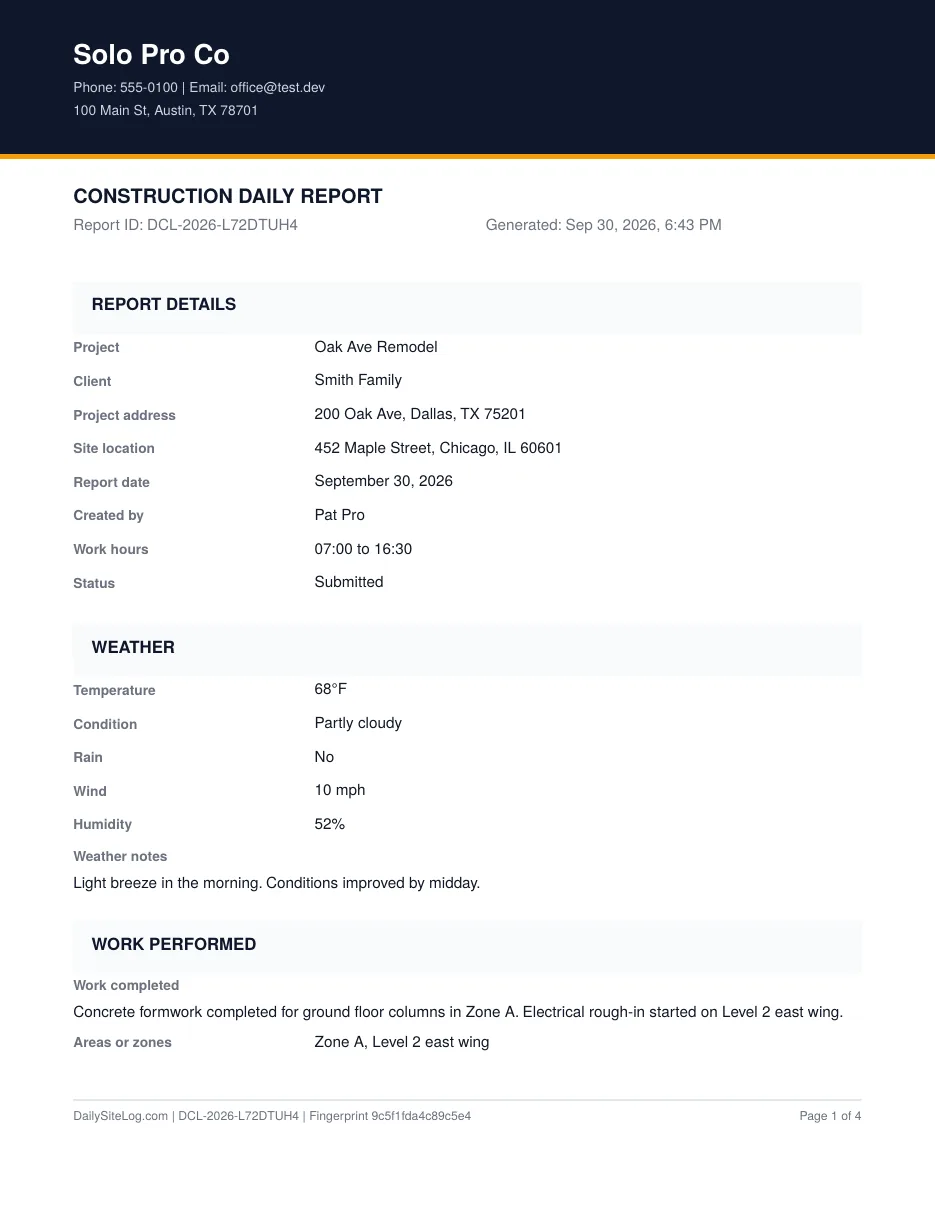
A construction daily report is the contractor's contemporaneous record of one day on one site. In a dispute it is asked for before anything else, so the template should be designed for the day it gets read by a lawyer, not just the day it gets filled in.
| # | Section | What goes in it | Why it matters later |
|---|---|---|---|
| 1 | Report details | Project, address, date, report number, who prepared it, site hours | Ties the page to a contract and a person |
| 2 | Weather | Conditions, high/low, wind, humidity, and the impact: what stopped, from when to when | Weather claims fail on impact, not on rain |
| 3 | Work performed | What, where (zone/grid/level), by whom; plan for tomorrow | Proves progress; shows the sequence you intended |
| 4 | Labor / manpower | Each trade, company, headcount, hours | Productivity and acceleration claims are built on this |
| 5 | Equipment | Machine, quantity, hours used, idle hours | Idle hours are compensable when the cause is not yours |
| 6 | Materials & deliveries | What arrived, quantity, supplier, who received it, condition | Late or short deliveries are the most common delay cause |
| 7 | Delays & issues | Type, description, time lost, cause / responsible party | The section that wins or loses the argument |
| 8 | Safety | Toolbox talk topic, PPE check, incidents or near misses, inspections and visitors | Regulatory record; also shows who was on site |
| 9 | Photos | Time, location, category, description | Photos without a log are just photos |
| 10 | Notes & sign-off | Free text; prepared by and reviewed by, with times | Makes it a signed record, not a draft |
Each section is short on purpose. A superintendent will fill in ten short sections at 4:45 pm. Nobody fills in twenty.
The five fields most templates miss
Search for a construction daily report template and you will find hundreds. Most are a header, a weather line, a labor table and a notes box. Here is what they leave out, and what it costs.
1. Weather impact, not just weather
"Rain, 64°F" is a fact. "Rain 10:00–13:00, exterior masonry and roofing stopped, 6 workers idle 3 hours" is a claim. Contracts award extensions for weather that prevents work beyond what a reasonable contractor expected, so the template needs a field for what stopped and for how long. Ours has it in section 2 and again as a delay row in section 7.
2. Time lost, in hours, per delay
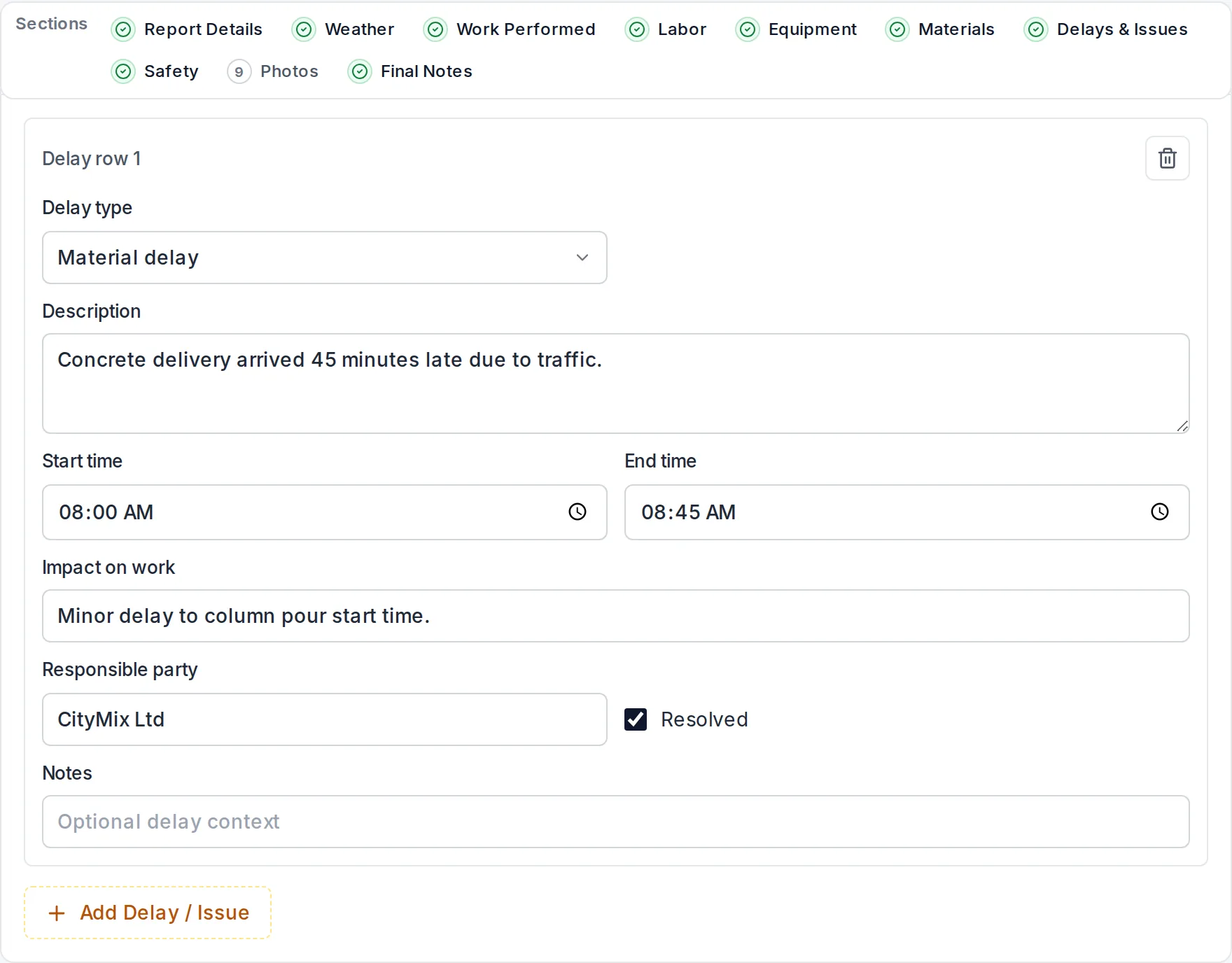
A description of a delay without a duration cannot be priced or scheduled. Every delay row needs hours. In the Excel version the column totals itself so the week's lost time is one number at the bottom of the sheet.
3. Cause and responsible party
Owner-caused, subcontractor-caused, supplier-caused, weather, or your own. Write it the day it happens. Deciding a month later who was at fault, from memory, is what turns a clear claim into a negotiation.
4. Equipment idle hours
Most templates record equipment hours used. The compensable number is often the hours a rented excavator sat waiting for a permit or a decision. Two columns, not one.
5. Who received the delivery, and its condition
"200 bags cement delivered" is not enough when 40 of them were wet. Received by, and condition or storage location, closes the gap between the delivery ticket and the argument about it.
How to fill it in (a 10-minute routine)
- Before leaving site, not after dinner. Times and headcounts are wrong by 20% when recalled the next morning.
- Report details first: date, report number in sequence. Gaps in the sequence are noticed.
- Weather: copy the conditions from a weather service for the site address at start, midday and end of shift, then write the impact line even if it is "none".
- Work performed: one line per activity, each with a location. "Formwork" is weak; "Formwork for columns C4–C9, level 2, Zone A, 80% complete" is a record.
- Labor: walk the site in your head by trade. Own crew first, then each subcontractor with headcount and hours.
- Equipment: include rented machines that sat idle and why.
- Deliveries: from the tickets in your pocket. Note shortages and damage.
- Delays: anything that stopped or slowed work. If nothing did, write "No delays" so silence is never mistaken for omission.
- Safety: toolbox talk topic, incidents (or "none"), and anyone who visited: inspector, owner, architect, with times.
- Photos: list what you shot. Take at least one wide progress photo from the same spot every day; it becomes a time-lapse of the job for free.
- Sign and time it.
Filled example
Below is section 7 from a real-format report so you can see the level of detail that holds up. (Names changed.)
| Type | Description | Time lost | Cause / responsible party |
|---|---|---|---|
| Weather | Heavy rain 10:05–13:10. Exterior masonry at west boundary wall stopped; crew moved to interior blockwork Block B. | 3.0 h × 6 workers | Weather (see weather section; NWS station KORD 0.9 in.) |
| Material | Rebar delivery for L2 slab arrived 14:30 vs 08:00 promised. Fixing crew (4) reassigned to cleanup. | 5.5 h × 4 workers | Supplier: Metro Steel, PO 4471 |
| Client decision pending | Tile selection for Unit 3 bathrooms still not issued (requested 09/22). Tiling cannot start Monday as scheduled. | 0 today; 2 days at risk | Owner |
Compare that with what most templates produce: "Rain in the morning. Steel late." Same day, same site, only one of them is worth anything in six months.
When a template stops being enough
A template is right when you have one or two sites, one person filling it in, and clients who accept a scanned page. It stops being enough when:
- The same person fills in the same header every day. Project, address, crews and equipment do not change; retyping them is where errors and skipped days come from.
- Photos live in a phone gallery and the report lives on paper. Six months later nobody can match them.
- You need proof the report was not edited after the fact. A Word file's modified date proves nothing. A sealed PDF with a fingerprint does.
- More than one site. An owner asking "did Site B file yesterday?" should not require a phone call.
At that point a purpose-built tool is cheaper than the hours. We compare the options honestly, including the free tiers and where they stop, in Construction daily report software: what it should do and what it costs.
A note on Excel vs PDF vs Word
- PDF is for the site. Print two pages, fill by hand, photograph both pages at the end of the day and send them to the office. It is slow to search later, but it gets filled in.
- Excel is for the office or for a foreman with a laptop. Totals are automatic, the delay type is a drop-down so "wx", "weather" and "rain" do not become three different things in your records, and a month of sheets can be summarised with a pivot table.
- Word is for building a company standard. Drop in the logo, add the fields your contract requires (some public jobs want a certified payroll reference or a specific safety attestation), save as a template, then export to PDF for the field.
Whichever you pick, use the same one every day. Consistency is most of the value.
Sources
- AIA A201-2017 General Conditions of the Contract for Construction
- ConsensusDocs 200 Standard Agreement and General Conditions
- US National Weather Service
Frequently asked questions
Should I use the Excel or the PDF template?
PDF if reports are filled by hand on site and scanned. Excel if someone types them up in the office, because labor and delay hours total automatically and the delay type is a drop-down so the wording stays consistent across reports. Word if you want to restyle it into a company standard first.
Can I add my company logo to the template?
Yes. The Word and Excel files are fully editable; replace the header line with your logo, company name, phone and email. Keep the section order the same so anyone reading a stack of reports finds things in the same place every day.
How long should a contractor keep daily reports?
Keep them at least as long as the limitation period for contract claims where you work, which is commonly six to ten years after completion, and longer if the contract or your insurer says so. Daily reports are the first thing requested in a delay or defect dispute, and a missing month is read against the contractor. This is general information, not legal advice.
Who should sign a daily report?
The person who was on site and observed the work, usually the foreman or superintendent, and ideally a reviewer such as the project manager. The signature and time matter more than the title: a report signed at 5:10 pm on the day is evidence; one typed up a week later is a recollection.
What is the difference between a daily report and a daily log?
In practice they are the same document. Daily log is common in the US among GCs and superintendents, daily report is what most software and owners call it, and site diary is the UK and Australian term. Some contracts use daily log for the superintendent's private notebook and daily report for the document issued to the owner; check the definitions clause.