
Short version
Good construction photo documentation answers three questions without anyone having to explain: what the photo shows, when it was taken, and where. Most contractors get the first one right and lose the other two the moment a photo is texted to the office.
The fix is simple: take photos in an app that stamps the date, time and GPS location onto the image, keep the originals, and attach the photos to the daily report for that day. The rest of this guide is the detail.
We make Daily Site Log, a daily report app with stamped photos, and we compare it with dedicated photo apps below.
Why site photos matter more than the written report
When a delay, a damage claim or a defect is disputed months later, the written daily report says what happened. The photo proves it. A report that says "rebar inspected and approved before pour" is a claim. A photo of the rebar with the date, time and location on it, taken an hour before the pour, is evidence.
Photos are also the only record of work that gets covered: what is inside a wall, under a slab or behind a ceiling. Once it is closed up, the photo is all there is.
What to photograph every day
A simple routine beats a long checklist nobody follows:
- Start of day. Each active work area, wide shot, before anyone starts. This shows the condition you inherited.
- Anything that will be covered tomorrow. Rebar, embeds, plumbing and electrical rough-ins, insulation, waterproofing. Take a wide shot and a close-up.
- Deliveries. The load on arrival, the delivery ticket, and any damage or shortage.
- Problems as they happen. Water, damage by another trade, work done wrong, missing information, unsafe conditions.
- Weather impact. Standing water, frozen ground, wind conditions that stopped a lift.
- End of day. The same areas as the morning, from the same spots. Morning and evening photos side by side show the day's progress better than any sentence.
Tip: shoot from the same spot each day for progress photos. A consistent angle makes a month of photos read like a time-lapse.
Make every photo answer when and where
The problem with phone photos
A phone saves the date and often the location inside the file's metadata. That metadata is fragile:
- Many messaging apps strip it when a photo is sent.
- Screenshots and edits create a new file with a new date.
- Anyone can change the date with free tools.
So the photo that reaches the office, or the lawyer, often has no reliable date at all.
The fix: a visible stamp and a kept original
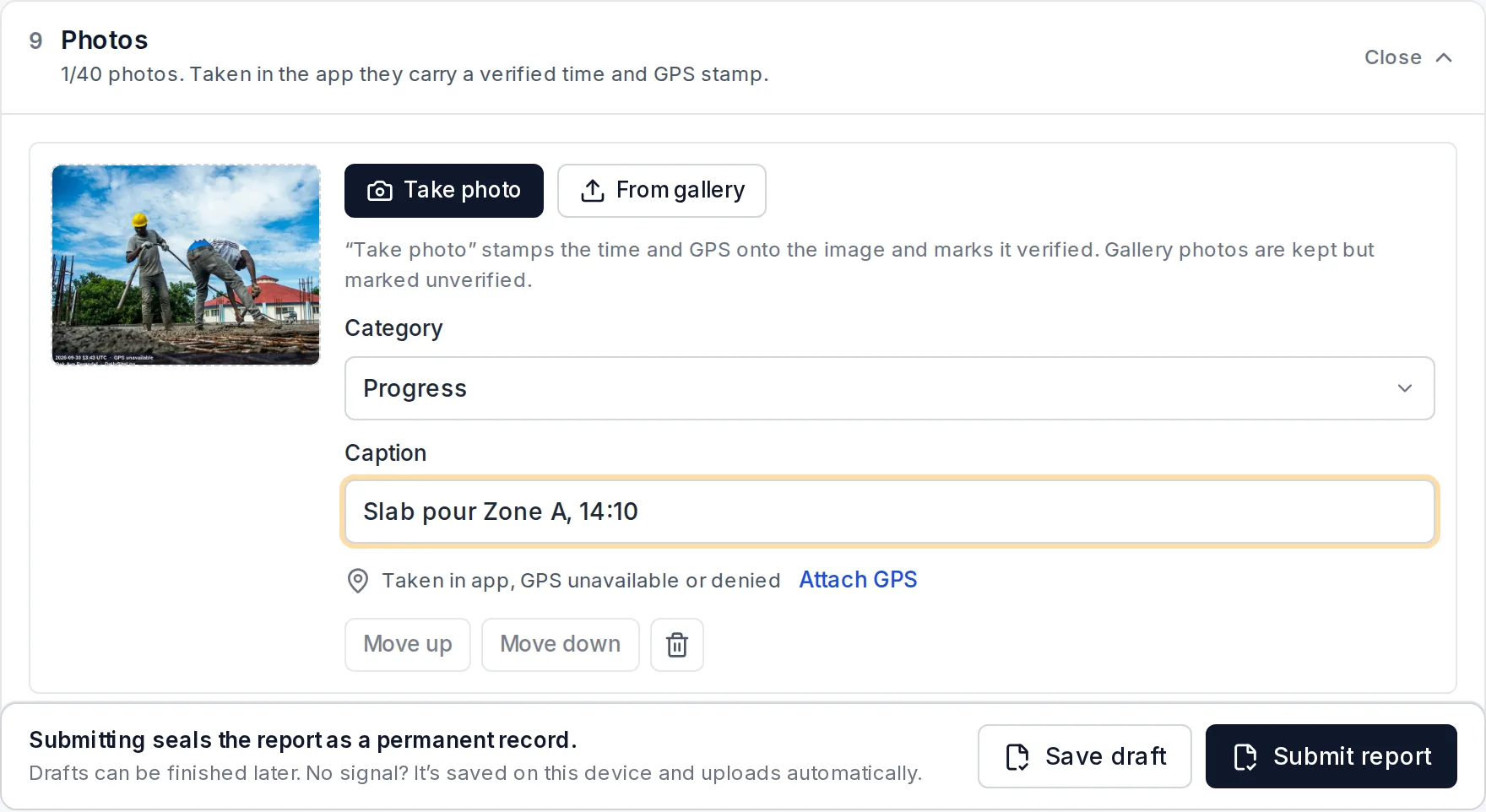
Use a camera app that stamps the date, time and GPS coordinates onto the image itself when you take the photo. A stamp survives forwarding. Keep the full-size original as well, and store it somewhere it cannot be edited without a trace.
In Daily Site Log, photos taken with the in-app camera are stamped with the time (UTC), GPS coordinates and accuracy, and the project name. When the report is submitted, each photo's SHA-256 fingerprint is sealed into the report, so anyone can check at dailysitelog.com/verify that a photo has not been swapped or edited since.
Tie photos to the daily report
Photos in a camera roll or a shared drive are hard to use. Photos attached to the daily report for that day are easy: the report says what happened and the photos sit right next to it, with the same date.
When you write the report, add a short caption to each photo that matters: "Area B slab rebar before pour, inspected by city at 10:40". The caption is what makes the photo searchable later.
Storage, sharing and how long to keep photos
- Keep originals. Send compressed copies to clients if you like, but keep the full-size files.
- One place per project. Not five phones and a group chat.
- Retention. At least the records period in your contract, commonly three to seven years after completion, and longer if defect claims can still be brought where you work.
- Access. The owner or project manager should be able to see the photos without needing an account on your system. A PDF with photos inside works for most clients.
Construction photo apps compared
There are two kinds of tools. Dedicated photo apps are built around galleries, sharing and markup. Daily report apps put stamped photos inside the daily record. Prices are from the sources listed; check each vendor's page before buying.
| Tool | Type | Price | Time and GPS stamp | Photos inside a daily report |
|---|---|---|---|---|
| CompanyCam (full pricing) | Dedicated photo app | Core $63/mo annual ($79 monthly, 1–2 users) · Crew $119/mo annual (3 users) · Scale $199/mo annual · extra users ~$29–$34/mo | Yes | Reports and pages, not a structured daily report |
| Daily Site Log | Daily report app | $0 (5 photos per report) · $19/mo Pro (up to 40 photos per report) · $79/mo Business (5 seats) | Yes, on photos taken in the app | Yes, in a sealed PDF |
| Your phone camera | General | Free | Only in metadata, easily lost | No |
How to choose:
- Photos are your main deliverable, you share galleries with customers and want markup and before/after pages: a dedicated photo app is worth it.
- You need a daily report anyway, and photos are part of the evidence: put the photos in the daily report and pay for one tool.
- You are a very small crew on a budget: start free, and upgrade when you hit the limit.
A checklist for any photo app
Whatever you use, check it does these:
- Stamps date, time and location on the image when taken.
- Keeps the original file.
- Works on site with no signal and uploads later.
- Ties photos to a project and a date without manual sorting.
- Lets you add a caption.
- Lets the client see photos without creating an account.
- Lets you export everything if you leave.
Sources
- Roofing Software Guide — CompanyCam pricing, every plan explained (updated September 2026)
- Capterra — CompanyCam pricing
- Daily Site Log pricing
Frequently asked questions
Do construction photos need a timestamp?
They should have one. Phone files carry a date in their metadata, but metadata is easy to lose when photos are sent by text or email, and easy to change. A stamp burned into the image, showing date, time and location, survives being forwarded and is much harder to argue with.
How many photos should be taken on a construction site each day?
Enough to show the state of every active work area, plus anything unusual: deliveries, damage, weather impact, safety issues, and every element that will be covered the next day. For a small job that is often 10 to 30 photos. Quantity matters less than being able to find the right photo for the right day.
Are site photos evidence in a construction dispute?
Yes, and often the most persuasive evidence there is, if the date and location can be shown and the photo can be tied to a written record of that day. A folder of undated phone photos is much weaker. This is general information, not legal advice.
What is the best construction photo app for a small contractor?
If photos are your main need and you want galleries, sharing and markup, a dedicated photo app such as CompanyCam is the standard. If you also need daily reports, a daily report app that stamps photos and puts them in the report avoids paying for two tools. Compare on the checklist in this article.
How long should construction photos be kept?
At least as long as the contract requires records to be kept, commonly three to seven years after completion, and ideally for the period in which defect claims can be brought, which can be longer. Keep the originals, not only the compressed copies sent to clients.